
article
Hidden feature of SysML – Activity Trees
- published =
- author = Tim Weilkiens
It is very well unknown and I know only a single modeling tool that explicitly supports it: the SysML activity tree. Although it is very useful and supports common systems engineering practice.
What am I talking about? You may know use cases and activities to describe the use case flows. Simply spoken they describe the functions of the system from the user perspective. The following figure shows a use case and the activity of a forest fire detection system (FFDS), The FFDS is the example I often use in this MBSE blog.
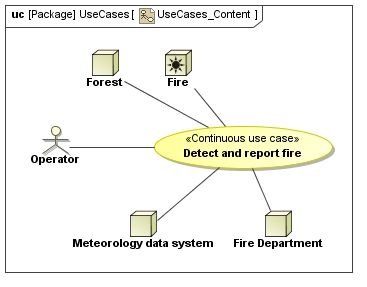 Use case "Detect and report fire" (click to enlarge) |  Use case activity "Detect and report fire" (click to enlarge) |
The activity is a behavioral view of the usage of system functions in a specific context. It is possible that one of the functions is also used in another context, e.g. the function “Warn operator” is also part of the use case “Simulate FFDS operation”.
What’s missiing is a structural view of the system function definitions like the block definition diagram for system parts. And the SysML activity tree is exactly the missing piece. The following figure shows the activity tree of our use case activity.

SysML activity tree (click to enlarge)
The boxes are the activities and the relationship between the boxes describes that an activity is called in the context of the upper activity. Attention: The tree shows a call hierarchy and not a ownership hierarchy. The tree does not show the control flow information you can see in the activity diagram.
Activities vs. Actions
Activities and actions are different model elements in SysML. The activity tree shows the activities (that’s why it is called so). The steps in an activity diagram are actions. A CallBehaviorAction is an action that calls an activity. You find detailed information about the language SysML in my book “Systems Engineering with SysML”.
To get trees of all steps modeled in activities you must create an activity for each action. All actions are CallBehaviorActions. Most modeling tools provide a good workflow to create these elements.
You could extend the SysML activity tree by adding information about the input and output data of the activities. The type of the data is associated with activity in the tree. You can’t differentiate input and output and can’t see the object flow.

SysML activity tree with object nodes (click to enlarge)
The SysML activity tree gives you a very good structural overview about the system functions. Functions are the core of each system. So it is of value to know them well. The FAS method (functional architectures for systems) also uses the SysML activity trees. You find more about FAS on the website www.fas-method.org.
Comments and Questions are welcome.